Getting Started with Brandstorm
A quick tour of your new AI marketing command center.
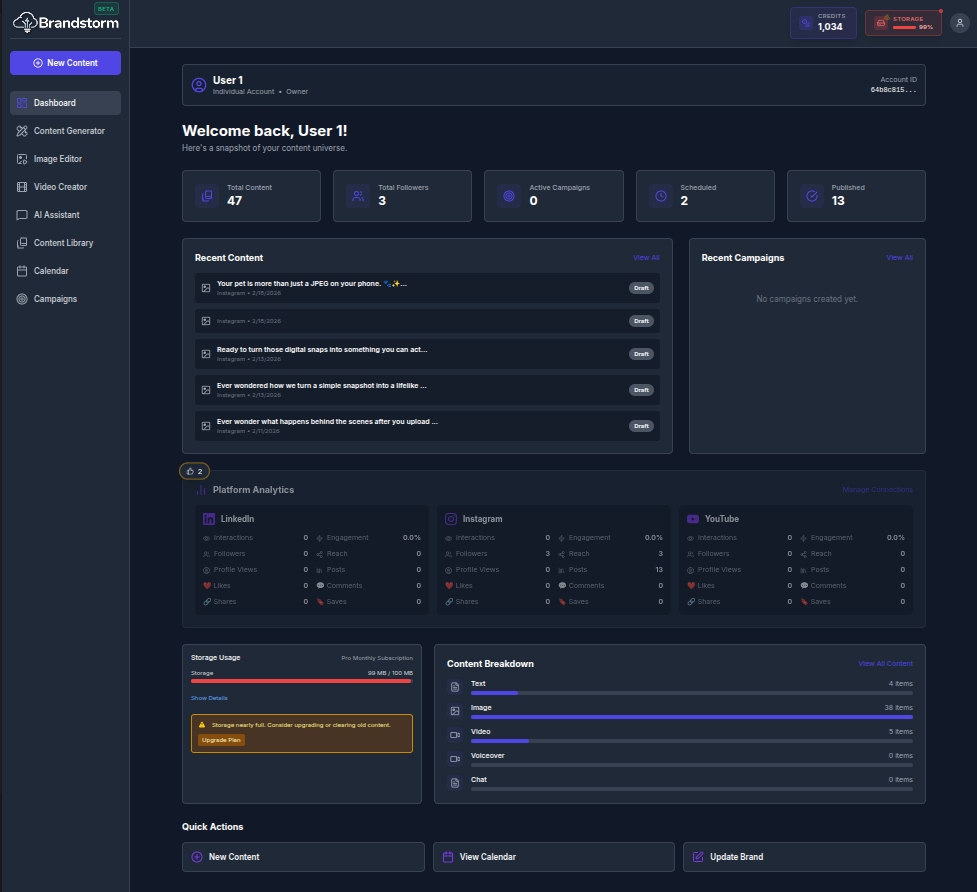
Welcome to Brandstorm
Brandstorm is your all-in-one AI marketing partner. It helps you generate, edit, schedule, and publish content across multiple social media platforms with ease.
Rapid Tour
1. The Dashboard
Your Dashboard is the primary page where you get a bird's-eye view, providing a high-level overview of your marketing performance, and recent activity.
- Activity Feed: A consolidated snapshot of key performance metrics and most recent activities across multiple social media platforms.
- Quick Stats: Track your storage usage and content breakdown at a glance.
- Shortcuts: One-click access to create new content (text, images, or videos), manage your content publication calendar and update your brand identity.
2. Navigation Sidebar
- Content Generator: The core tool to guide you through selecting a target platform and content format, then capturing your requirements in a prompt to generate tailored content.
- Image Editor: AI Image Editor enables users to upload images and apply AI-assisted editing to enhance quality, adjust elements, and produce polished outputs aligned to their intended use.
- Video Creator: AI Cinematic Video Creator transforms a short creative brief into a narrative video by generating a storyline, scene structure, and visual direction to accelerate production from concept to draft.
- AI Assistant: Cloudy is an AI-powered marketing assistant that supports brainstorming, message development, and channel-specific recommendations to help teams plan and refine marketing initiatives more efficiently.
- Content Library: Content Library centralizes all generated assets, enabling users to browse, search, filter, and organize content for reuse, versioning, and faster retrieval across projects.
- Calendar: Content Calendar provides a centralized view of planned and scheduled content, helping teams coordinate publication dates, maintain a consistent cadence, and manage timelines across channels and campaigns.
- Campaigns: Campaigns helps teams structure and manage marketing initiatives by organizing assets around defined goals, audiences, channels, and timelines—making it easier to plan, execute, and measure cohesive campaigns.
- Connections: Manage your social media integrations.
Setting Up
To ensure higher-quality, on-brand output and a smoother publishing workflow, first connect your social media accounts and complete your Brand Identity profile so the platform can tailor content generation and enable direct publishing.
Platform Connections
Securely integrates your social media channels so you can publish from one workspace and monitor key performance metrics in a unified analytics view. Learn more at undefined/help/connecting-social-accounts
Brand Identity
Your Brand Identity is a persistent brand profile the AI references for future content generation. Capture foundational details such as company information, products or services, messaging and tone, visual identity guidelines, and a brand character/persona to keep outputs consistent, recognizable, and aligned with your standards across channels. Learn more at undefined/help/brand-identity
🎥 Video Walkthrough Steps
(Use these steps to record the "Getting Started" screencast)
- Start on Dashboard: Begin recording on the main Dashboard page.
- Highlight Stats: Slowly move your mouse over the top "Quick Stats" cards to show the hover effects.
- Scroll Activity: Scroll down to show the "Recent Activity" feed, then scroll back up.
- Show Sidebar: Briefly hover over the sidebar menu items (Content Generator, Image Editor, etc.) to show navigation options.
- Visit Connections: Click on "Connections" in the sidebar to show where to link accounts.
- End: Return to the Dashboard to finish the video.